- Reliability & Accuracy
- Monitoring the integrity of data collection
- Classification of apps
- Experimental research
- Analysis support
- Studies using Apps Scheduler
Reliability & Accuracy
The reliability of Apps Scheduler was evaluated following a standard procedure. Data from three or more users was collected using Apps Scheduler and two other tracking apps over 5-7 days. Statistical analyses were performed to determine the reliability of Apps Scheduler. The latest version has shown good correspondence with other apps such as StayFree and Digital Wellbeing.
Objective: To evaluate the agreement of smartphone usage duration recorded by Apps Scheduler and two other phone tracking apps (StayFree and Digital Wellbeing).
Data: Daily phone usage duration.
| ID | Day | Apps Scheduler | StayFree | Digital Wellbeing |
|---|---|---|---|---|
| T1 | 1 | 2:22:13 | 2:22:59 | 2:23:00 |
| T1 | 2 | 1:33:43 | 1:33:44 | 1:34:00 |
| T1 | 3 | 0:14:36 | 0:15:00 | 0:15:00 |
| T1 | 4 | 2:26:00 | 2:32:20 | 2:33:00 |
| T1 | 5 | 1:20:38 | 1:24:01 | 1:23:00 |
| T1 | 6 | 0:59:49 | 1:36:00 | 1:00:00 |
| T1 | 7 | 1:43:15 | 1:44:10 | 1:44:00 |
| T2 | 1 | 5:00:35 | 5:01:45 | 5:36:00 |
| T2 | 2 | 3:38:42 | 3:39:40 | 3:36:00 |
| T2 | 3 | 2:14:17 | 2:14:51 | 2:10:00 |
| T2 | 4 | 6:18:19 | 6:22:03 | 6:31:00 |
| T2 | 5 | 3:46:36 | 3:50:40 | 4:03:00 |
| T2 | 6 | 3:05:53 | 3:07:20 | 3:19:00 |
| T2 | 7 | 4:11:35 | 4:12:58 | 4:30:00 |
| T3 | 1 | 2:25:18 | 2:14:26 | 2:16:00 |
| T3 | 2 | 3:06:41 | 2:30:44 | 3:08:00 |
| T3 | 3 | 3:54:06 | 3:54:56 | 3:58:00 |
| T3 | 4 | 3:38:04 | 3:40:29 | 3:44:00 |
| T3 | 5 | 2:22:17 | 2:23:03 | 2:28:00 |
| T3 | 6 | 4:22:02 | 4:18:42 | 4:19:00 |
| T3 | 7 | 1:23:28 | 1:24:07 | 1:24:00 |
Results: Based on the intra-class correlation coefficient (ICC) value of 0.99 (95% CI [0.98, 1.00]), there was a high level of consistency in measurements across Apps Scheduler and two other apps. The three apps produced highly comparable measurements of smartphone usage duration across observations.
Additional two pairwise comparisons of Apps Scheduler with one other app also produced ICC values, consistently at 0.99 (95% CI [0.98, 1.00]).
Bland-Altman plots are presented below to further identify how measurements may differ for 3 individual cases (T1, T2, and T3).
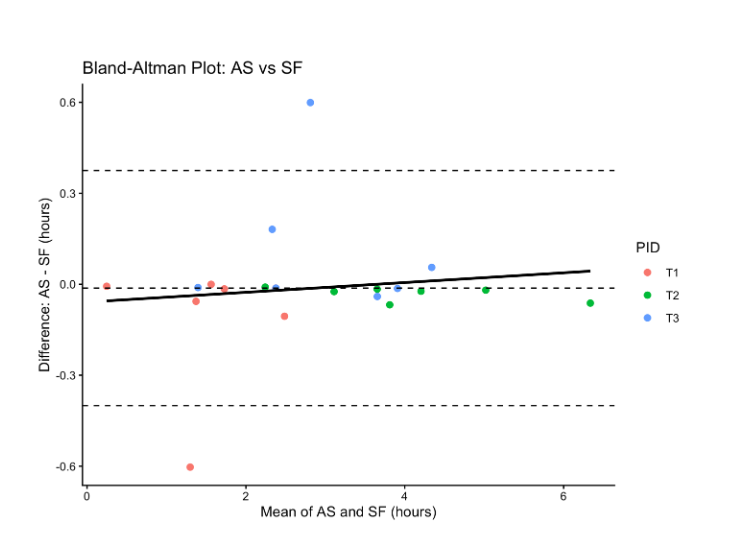
Each datapoint represents one observation/day. Based on the graph comparing Apps Scheduler and StayFree, the mean difference line (dotted horizontal line) is very close to 0, indicating minimal overall bias between these two apps. Most dots cluster closely around the mean difference line, suggesting generally strong agreement between Apps Scheduler and StayFree. Only two dots fell beyond the 95% limits of agreement (i.e., mean difference ±1.96 SD). The black regression line is nearly flat with a slight positive slope, suggesting little evidence of proportional bias across different levels of phone use duration. Overall, the plot suggests good agreement between Apps Scheduler and StayFree with only minor isolated discrepancies.
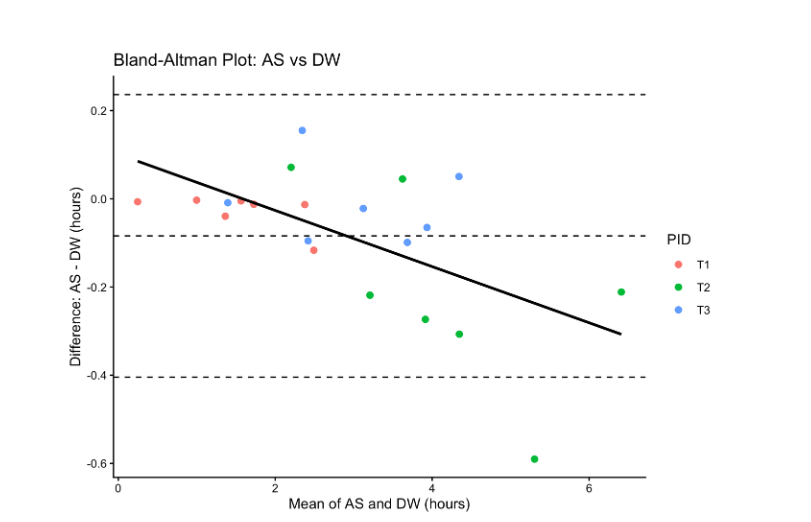
Comparing between Apps Scheduler and Digital Wellbeing, the dotted mean difference line is below 0, indicating that Apps Scheduler tends to record slightly lower usage duration than Digital Wellbeing. Only one dot fell beyond the 95% limits of agreement, suggesting overall acceptable agreement between the two apps. The negative sloping regression line indicates that as average, as phone use duration increases, Apps Scheduler tends to record slightly lower values relative to Digital Wellbeing. A greater spread of dots at higher usage durations also indicates increased variability at higher usage observations. A few observations of subject T2 appear further from the mean difference line, suggesting subject-level variability in agreement between the two apps. Overall, the plot suggests generally good agreement with some potential proportional bias and increased disagreement at higher usage durations.
Conclusions: The findings suggest that the three apps produced highly comparable measurements of phone use duration, although minor variability and occasional discrepancies were observed at the individual observation level.
However, it is still highly recommended that researchers conduct their own testing and reliability analysis at different stages of data collection. They should incorporate regular monitoring procedures throughout their studies.
Monitoring the integrity of data collection
Several AS web modules allow researchers to monitor the integrity of the data collection process. These include Runtime status, Notification, and Auto-report management modules. Understanding how these work together will allow researchers to diagnose potential system or participant errors. Detailed information is provided on AS web.
Classification of apps
Apps are comprehensively classified by default into 57 categories, based on Play Store's catalog. Researchers can create their own categories to monitor target apps and organize their database based on study objectives.
Experimental research
The Scheduling strategy module can help researchers conduct experimental studies. The convenient implementation of schedules and dynamic rules allows testing of scheduling algorithms in single-subject and group studies. Detailed information is provided on AS web.
Analysis support
The Total Analysis and Single-Subject modules provide analysis results across one study group and for one participant. Researchers can analyze the data based on single or multiple apps. Most tables and graphs are downloadable. Researchers can also choose to add phase lines and phase average or median lines to their graphs. Additionally, two types of interval recording plots are available to show app usage patterns across time, with pre-defined colors indicating varying levels of usage in seconds or minutes.
Studies using Apps Scheduler
We have completed several pilot studies and main studies are ongoing. Please check back for more information and citations.